Alpine.store in the Hyvä theme

Introduction
If you have worked with Hyvä, you are already familiar with Alpine.js and how it’s used within the theme. While the default Hyvä theme does not make use of Alpine.store, in real-world Hyvä-based projects it can be very useful in specific scenarios.
What Is Alpine.store?
Alpine.store (available since Alpine.js v3) creates a reactive global data object that exists outside any component’s scope.
Unlike x-data, which is scoped to a specific DOM subtree, a store is:
- Globally accessible
- Shared across all Alpine components
- Available via the
$storemagic property
You initialize a store once, and every component on the page can read and update it reactively.
Initializing a Store
document.addEventListener('alpine:init', () => {
   Alpine.store('private', {
       isClicked: false
   });
});
Reading and Writing Store State
<div x-data>
   <template x-if="$store.private.isClicked">
       <span>You have clicked `Click Me` before </span>
   </template>
</div>
<div x-data>
   <button @click="$store.private.isClicked = true">
       Click Me
   </button>
</div>
Using the Store Inside Component Logic
function initComponent() {
   return {
       init() {
           if (this.$store.private.isClicked) {
               console.log('Component is initialized after the click');
           }
       }
   }
}
When to Use Alpine.store
| ✅ Good fit when: | ❌ Avoid using it when: |
|---|---|
| Multiple independent layout blocks share the same state | State is local to one component |
| You need a single source of truth | You already rely heavily on event-based patterns |
| Customer/session data must be accessible globally | The problem can be solved with simple $dispatch |
How Reactivity Works Across Components
Alpine wraps stores in its reactive system (the same mechanism as Vue’s reactivity engine). This ensures that updates to store properties automatically propagate to any component that depends on them.
This means:
- Any property change triggers updates everywhere it’s used
- Components do not need to be related in the DOM
- No custom events or listeners are required to keep Alpine components in sync with each other
Architecture Example. Promo Campaign
Let’s abstract and imagine that you don’t have any existing way to implement a promo campaign. This is a simplified, theoretical example of how Alpine.store can be used.
The feature spans four independent Hyvä layout blocks, all sharing one reactive store.
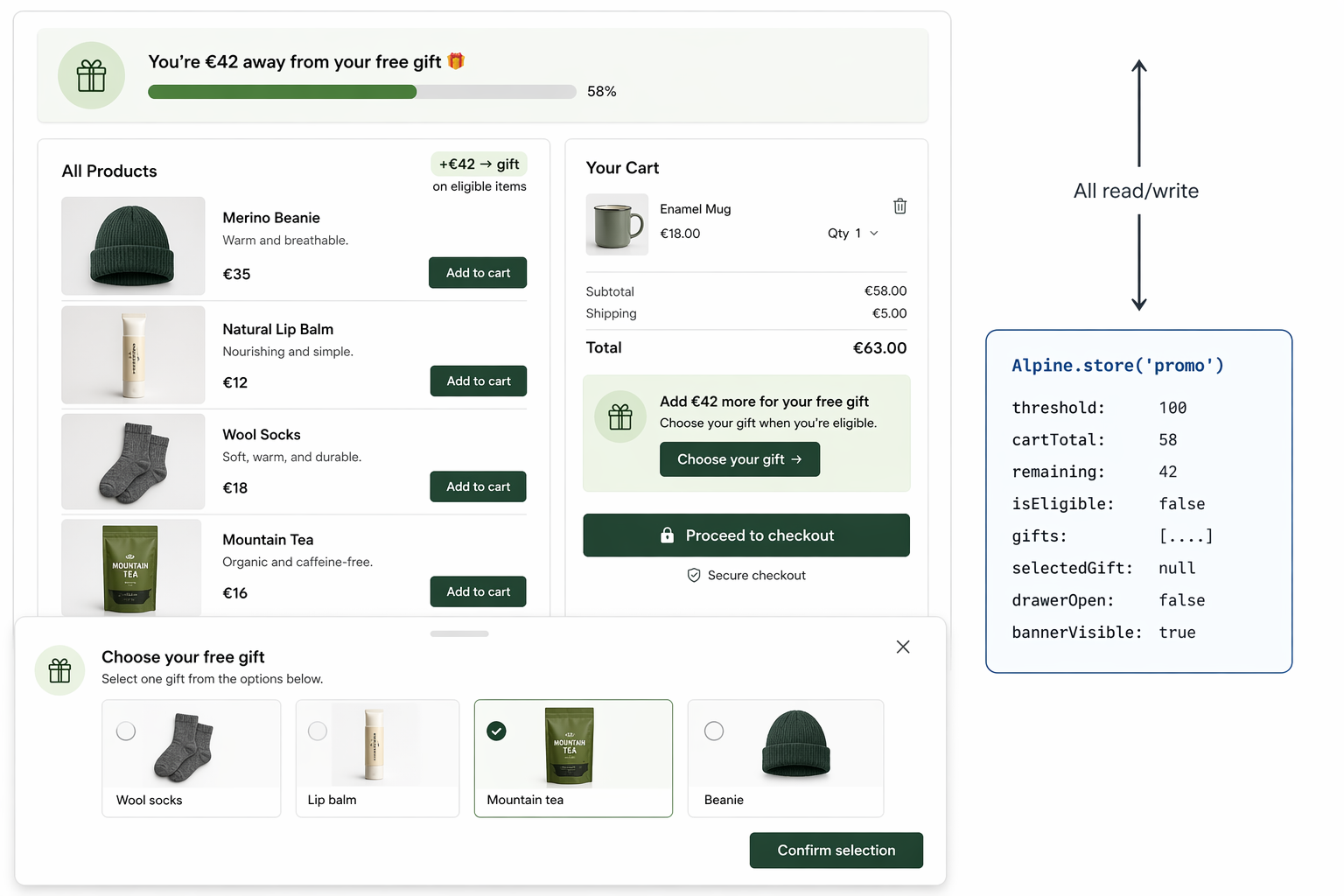
Data Flow
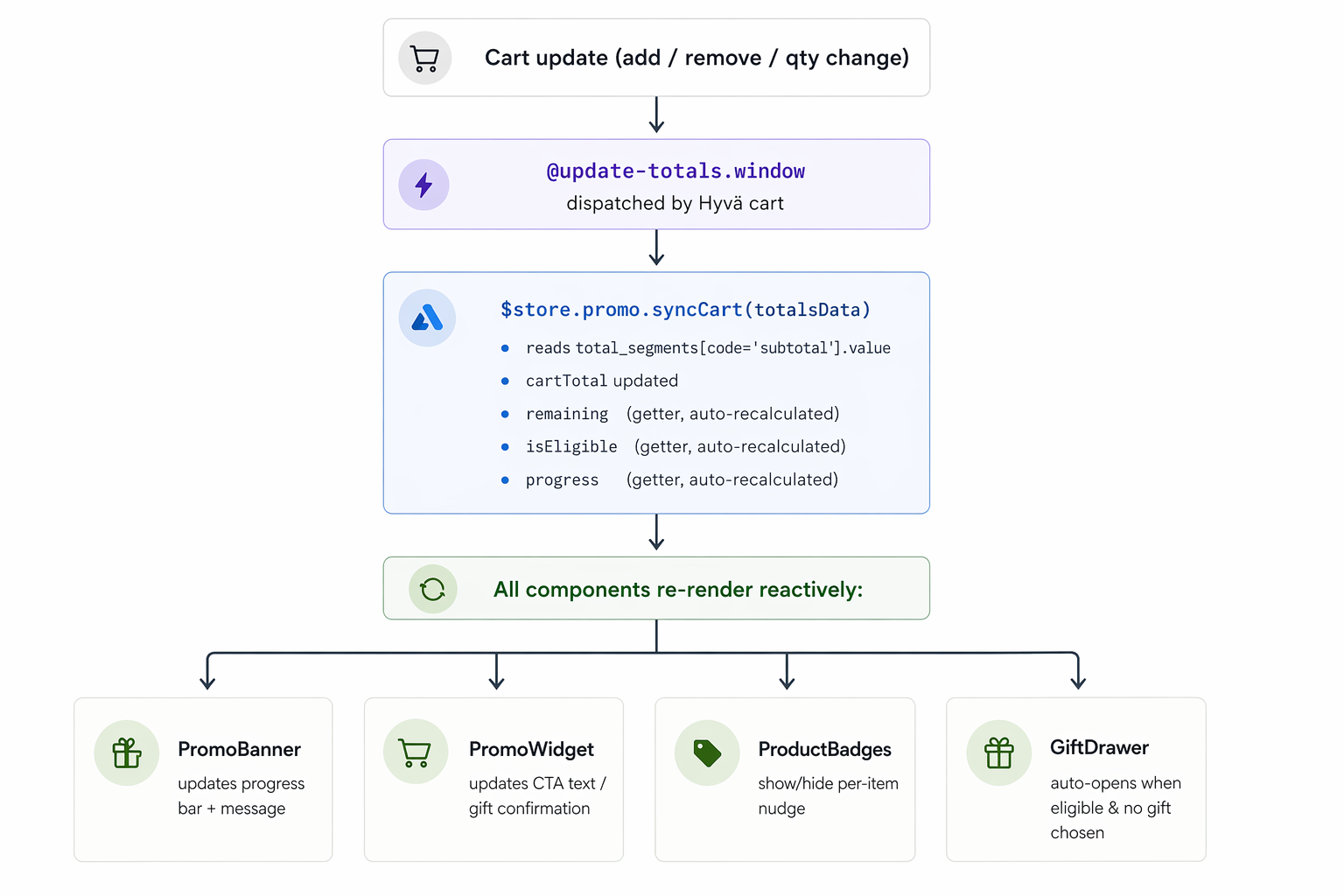
1. Store Initialization
Register the store once, either in your theme’s default_head_blocks.xml or a dedicated JS module. The store listens to @update-totals.window, the same event Hyvä’s own initCartTotals() uses and extracts the subtotal from total_segments.
Guard the registration so that a second call (from a duplicate layout block or a third-party module re-dispatching alpine:init) does not silently reset accumulated state:
<?php
// gift-store-init.phtml
/** @var \Your\Module\Block\PromoGifts $block */
/** @var \Magento\Framework\Escaper $escaper */
/** @var \Hyva\Theme\ViewModel\HyvaCsp $hyvaCsp */
?>
<script>
document.addEventListener('alpine:init', () => {
    if (Alpine.store('promo')) return; // already registered, do not overwrite

    Alpine.store('promo', {

        // ── Config ──
        threshold: 100,

        // ── State ──
        cartTotal: 0,
        gifts: <?= /** @noEscape */ json_encode($block->getPromoGifts()) ?>,
        selectedGift: null,
        drawerOpen: false,
        bannerVisible: true,

        // ── Computed getters ──
        // These recalculate whenever the flat primitives they depend
        // on (cartTotal, threshold) are reassigned.
                // Keep store shape simple when possible.
                // Deeply nested state is still reactive,
                // but flatter structures are usually easier to reason about and maintain.
        get remaining() {
            return Math.max(0, this.threshold - this.cartTotal);
        },
        get isEligible() {
            return this.cartTotal >= this.threshold;
        },
        get progress() {
            return Math.min(100, (this.cartTotal / this.threshold) * 100);
        },

        // ── Actions ──
        selectGift(gift) {
            this.selectedGift = gift;
        },
        openDrawer() {
            this.drawerOpen = true;
        },
        closeDrawer() {
            this.drawerOpen = false;
        },
        dismissBanner() {
            this.bannerVisible = false;
        },

        // ── Cart sync ──
        // totalsData matches window.checkoutConfig.totalsData shape:
        // { total_segments: [{ code: 'subtotal', value: 58.00 }, ...] }
                // for demo purposes it only handles the transition into eligibility
        syncCart(totalsData) {
            const segment = totalsData?.total_segments
                ?.find(s => s.code === 'subtotal');
            this.cartTotal = segment?.value ?? 0;

            if (this.isEligible && !this.selectedGift) {
                this.openDrawer();
            }
        },

        // ── Event listeners ──
        // Mirrors the pattern used in Hyvä's own initCartTotals()
        eventListeners: {
            ['@update-totals.window']($event) {
                Alpine.store('promo').syncCart($event.detail.data);
            }
        }
    });
});
</script>
<?php $hyvaCsp->registerInlineScript() ?>

<!-- Place once in default.xml, outside #maincontent -->
<div x-data x-bind="$store.promo.eventListeners"></div>
Hyvä’s hyva.replaceDomElement() (used by cart.phtml after cart operations) replaces the main content area without re-firing alpine:init, so the store survives intact. Any listener element placed inside #maincontent would be destroyed and never re-attached.
2. Promo Banner header.phtml
<div
    x-data
    x-show="$store.promo.bannerVisible"
    class="promo-banner"
>
         <!-- your code -->
</div>
3. Promo Widget cart.phtml
<div x-data class="promo-widget">
    <template x-if="!$store.promo.isEligible">
        <!-- your code -->
    </template>

    <template x-if="$store.promo.isEligible && !$store.promo.selectedGift">
         <!-- your code -->
    </template>

    <template x-if="$store.promo.selectedGift">
       <!-- your code -->
    </template>
</div>
4. Gift Chooser Drawer gift-drawer.phtml
<div
   x-data
   x-show="$store.promo.drawerOpen"
   @keydown.escape.window="$store.promo.closeDrawer()"
>
   <div class="drawer-header">
       <h2>Choose your free gift</h2>
       <button @click="$store.promo.closeDrawer()">✕</button>
   </div>
   <div class="gift-grid">
       <template x-for="gift in $store.promo.gifts" :key="gift.id">
         <!-- your code -->
       </template>
    </div>
</div>
5. Product Badge product-item.phtml
<!-- Rendered inside each product card in the listing -->
<div x-data >
   <template x-if="!$store.promo.isEligible && product.contributesToPromo">
       <!-- your code -->
   </template>
</div>
Store Lifetime and Re-initialization
An Alpine.store is registered once and lives for the lifetime of the current page. In standard Magento/Hyvä full-page loads this is fine - the store is torn down with the page. Two edge cases are worth knowing.
Double initialization. If alpine:init fires more than once, for example, a layout block is included in two places, or a third-party module re-dispatches the event and calls Alpine.store('promo', { ... }) again, re-registering a store with the same name. This can overwrite its existing state. While this behavior is not emphasized in the Alpine documentation, guarding the initialization is a good defensive practice to prevent accidental resets caused by duplicate layout blocks or re-dispatched alpine:init events.
The guard at the top of the registration block handles this:
if (Alpine.store('promo')) return;
Hyvä’s replaceDomElement. As seen in cart.phtml, Hyvä can swap out #maincontent via hyva.replaceDomElement() after cart operations. This re-renders the DOM but does not re-run alpine:init, so the store survives intact, which is exactly what you want. This is why the cart-sync listener must live outside #maincontent in default.xml.
Summary
Alpine.store is a simple and powerful way to share reactive state across independent components.
For state that stays inside a single .phtml, keep using x-data. Reach for Alpine.store when the state genuinely needs to escape component boundaries.
Used correctly, it helps maintain a clean architecture and reduces the need for cross-component event wiring.
Further reading: Alpine.js $store documentation · Alpine.js Alpine.store() API documentation